Welcome to the ultimate beginner’s guide for taking your business online. If you are wondering how to create a website using WordPress without feeling overwhelmed by technical jargon, you are in the perfect place. Many new entrepreneurs believe that building a digital storefront requires expensive developers or complicated coding skills. Fortunately, that is no longer the case.
WordPress is the most popular content management system in the world, powering over 40% of the entire internet. It is highly customizable, incredibly user-friendly, and perfect for businesses of all sizes. This comprehensive guide will walk you through the absolute simplest method to launch your professional online presence today.
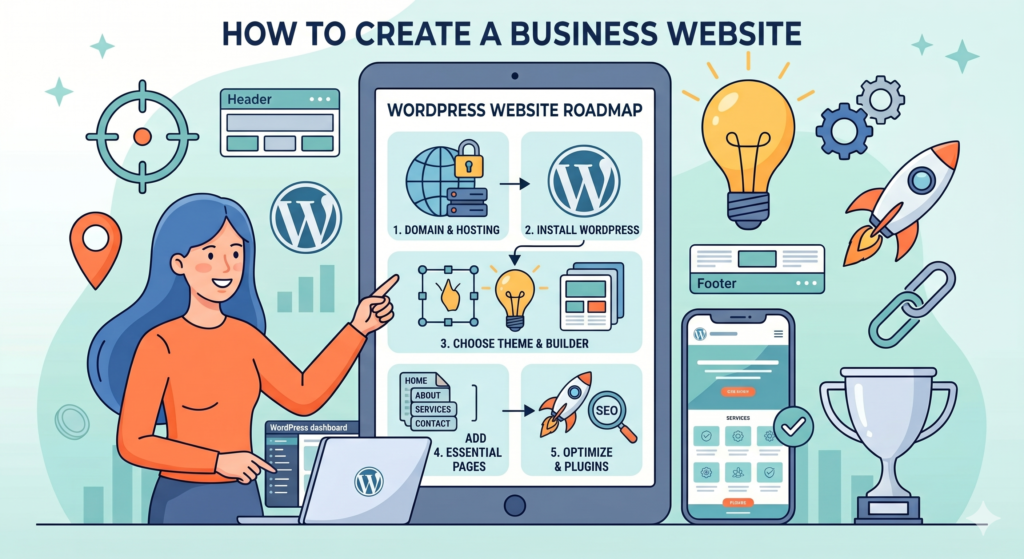
Step 1: Secure Your Domain Name and Web Hosting
The very first step in figuring out how to create a website is securing your digital real estate. You cannot build a site without a solid foundation. For this, you need two essential components: a domain name and web hosting.
Your domain name is your permanent web address (like [suspicious link removed]). It should be memorable, short, and closely tied to your brand name. Avoid using numbers or hyphens, as they can confuse potential customers. Next, you must purchase web hosting. Think of hosting as the physical land where your website’s files, images, and text will live. We strongly recommend choosing a reliable hosting provider that offers 24/7 customer support and a free SSL certificate. Securing fast, reliable hosting is the absolute foundation of how to create a website that loads quickly and ranks well on search engines.
Step 2: Install WordPress Automatically
In the past, installing website software required manual database creation and file uploads. Today, a major advantage of learning how to create a website is that the process is largely automated.
Almost all modern and reputable hosting companies offer a “One-Click WordPress Install” feature directly inside their user dashboard. Once you purchase your hosting plan, simply log into your control panel, locate the WordPress icon, and click install. Within a few minutes, the server will generate a blank, functional website for you. You will then be prompted to create an admin username and password. Keep these credentials safe, as you will use them to log into your backend dashboard to manage your entire business platform.
Step 3: Choose the Perfect Theme and Page Builder
Now comes the fun part. A critical phase in understanding how to create a website is deciding how it will look to your visitors. WordPress uses “themes” to dictate the overall design and layout of your site.
Navigate to your dashboard, click on “Appearance,” and select “Themes.” You can choose from thousands of free options. We recommend starting with a lightweight, fast-loading theme. To make the design process completely effortless, you should install a visual page builder plugin like Elementor. Elementor allows you to drag and drop text blocks, images, videos, and buttons exactly where you want them, all without writing a single line of code. Using a drag-and-drop builder is the ultimate secret to how to create a website that looks like a premium digital agency built it.
Step 4: Add Essential Pages for Your Business
You do not need fifty different pages to launch your brand successfully. A core part of how to create a website for a local or online business is organizing your information logically so customers can find what they need instantly. Focus on these four essential pages:
- Homepage: This is your digital storefront. Clearly state what your business does, who you serve, and include a strong call to action (like “Get a Quote”).
- About Us: People buy from people. Share your company’s story, your mission, and introduce your team to build trust.
- Services/Products: Detail exactly what you offer. Use high-quality images and clear descriptions.
- Contact Page: Make it incredibly easy for people to reach you. Include a simple contact form, your business email, phone number, and physical address if applicable.
Making it simple for customers to contact you is the main reason you wanted to know how to create a website in the first place.
Step 5: Install Essential Plugins and Optimize
Plugins are like mobile apps for your WordPress site. They add powerful functionality with just a few clicks. When discovering how to create a website, you must install a few mandatory plugins to ensure your site is secure and visible.
You will need a robust security plugin to block malicious attacks and hackers. Next, install an SEO plugin like Rank Math to help optimize your page titles and meta descriptions for search engines. Finally, ensure you have a caching plugin to dramatically speed up your page load times. If you want to dive deeper into community-driven optimization techniques, you can explore the official WordPress Support Forums rel=”dofollow”. If you ever need advanced customizations or professional SEO optimization, our expert web design team can help you scale your platform to the next level.
Conclusion
Taking your business online is a massive milestone. Mastering how to create a website using WordPress gives you complete control over your digital brand. By following these simple steps—getting solid hosting, using a visual builder like Elementor, and keeping your page structure clean—you establish a powerful digital footprint. Do not overcomplicate the process by striving for perfection on day one. Launch your site, gather customer feedback, and improve it over time. We hope this complete guide on how to create a website has given you the confidence to start building your business empire today!